> For the complete documentation index, see [llms.txt](https://zach-wong.gitbook.io/easy-reads/llms.txt). Markdown versions of documentation pages are available by appending `.md` to page URLs; this page is available as [Markdown](https://zach-wong.gitbook.io/easy-reads/ictf-2024-writeups/undelete.md).
# UnDelete
**Challenge Name: UnDelete**
**Category: Forensics**
**Difficulty: Medium**
**Description: When was the suspicious file deleted? Flag format: MM/DD/2004 12:00:00 UTC**
The challenge provided an `.ad1` file to us. The "a" and "d" means Access Data. A quick look up of Access Data reveals that they have a product called FTK Imager which is used to image hard drives and read image data, which is what the file given to us is. So let's open it up there!
So once you loaded FTK Imager, click on the icon shown to `Add Evidence Item`.
Click on `Image File`.
Now locate the file provided to us and select it as our data source.
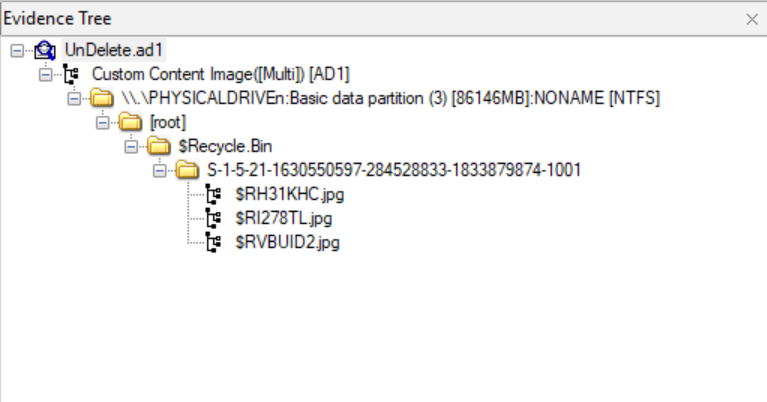
Looking at the `Evidence Tree`, we can actually expand the folders. Now within the `root` directory contains a `$Recycle Bin` folder, this folder is where your recycle bin items are! Within that folder contains a weird ID, this ID is called a SID or Security Identifier. Basically, it is your user's ID within a Windows computer.
Clicking on that folder and looking at the contents, reveals a couple of files one of which asks us, "When was I deleted?" a hint that the timestamp of which this file is deleted is the flag. Looking at the modified date at the side which describes when the file was modified in any way including deletion shows us that the file was deleted on `04/14/2024 10:47:45 AM` which is already in UTC timing as FTK Imager will automatically convert the timing to UTC timing.
```
Flag: ICTF24{04/14/2024 10:47:45 AM}
```